

Uploading a Podcast Manually
How to Upload a Podcast Manually
Section titled “How to Upload a Podcast Manually”EnaCast allows you to upload podcasts manually, an ideal option for content that was not recorded automatically (such as external interviews, reports or audio clips) or that you wish to publish on a one-off basis.
Access the Control Panel
Section titled “Access the Control Panel”Go to enacast.com/admin and log in with the credentials provided by the EnaCast team. If you do not have access, contact the technical manager at your station.
Go to the “Podcast” Section
Section titled “Go to the “Podcast” Section”Once inside the panel, in the main menu, select the Podcast option.
Click on “Add New Podcast”
Section titled “Click on “Add New Podcast””Click the Add podcast button to start creating a new manual entry.
Fill in the Podcast Profile
Section titled “Fill in the Podcast Profile”Enter the following details:
- Name: podcast title (clear and descriptive)
- Description: short text that will appear below the player on the website
- Image: optional, you can upload a specific image for this audio (if none is uploaded, the image from the associated programme will be used)
- Broadcast date: the date on which the original content was broadcast
- Publication date: if you want the podcast to be published later, you can schedule its publication here
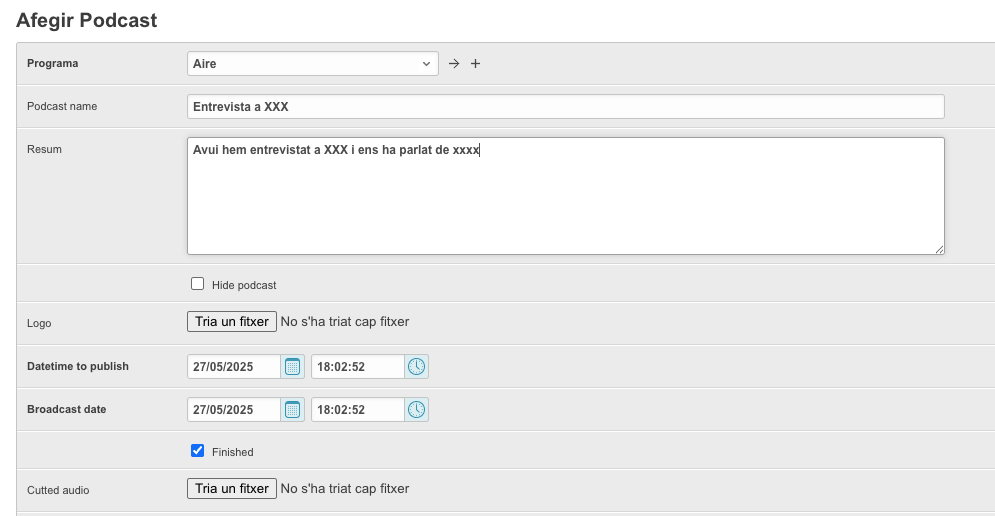
Assign the Podcast to a Programme
Section titled “Assign the Podcast to a Programme”In the Programme dropdown, select which programme this podcast belongs to.
Upload the Audio File
Section titled “Upload the Audio File”Click on Upload file and select the audio file in .mp3 format.
Save and Publish
Section titled “Save and Publish”Review that everything is correct and click Save or Publish.
The podcast will be available on the website automatically and, if the programme is visible, it will also appear on the main podcasts page.