

People
People brings together everyone who appears on the radio: program hosts and collaborators, guests of the regular sections and news writers. Each person belongs to one radio and, if they have something published, has their own page on the public website.
The people list
Section titled “The people list”In the side menu, under Content, open People. Search by name with Search people…; the list shows each person’s name, bio and links. Under the name is their identifier (for example, albert-puig), the one used in the address of their page. People linked to a news byline carry the Author label.
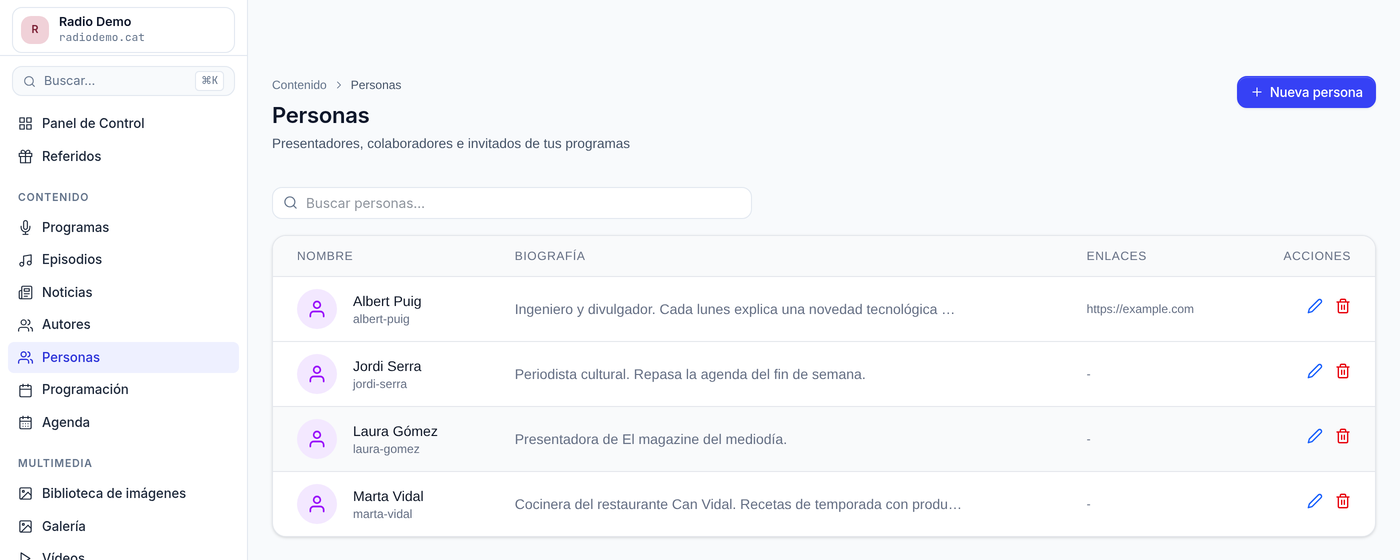
(The screenshot shows the Spanish interface of the demo station.)
Radio admins, news editors and program editors (who pick section guests) can see it. All of them can create people. Radio admins and news editors can edit anyone; a program editor can edit a person only if every program and regular section the person appears in is one they edit. Only radio admins can delete people.
Create or edit a person
Section titled “Create or edit a person”Click New person, or the pencil on a row to edit it. When you edit a person, View on website at the top of the form opens their public page; if they do not have one yet (see below), it says “No public page yet: this person is not in any published program, section or article.”. The form has:
- Photo: chosen from the image library. Remove photo clears it. In the Image Library, the Origin filter (Person photo) and the Used in filter (Used in people) find these photos.
- Name (required).
- Short bio: who they are and what they do on the radio. Shown on their public page.
- Website and X / Twitter: links shown on their page.
- Email: only visible to the radio’s admins; never published.
You do not need to create everyone here. People are also created automatically:
- when you type a new host in a program;
- when you add a new guest to a regular section (Create “name”);
- when you accept a Detect regular sections proposal with guests that did not exist yet.
A radio cannot have two people with the same name; capitals and accents do not count (“Àngel” and “Angel” are the same person). If you type a name that already exists, EnaCast does not create another person: it offers you the existing one.
People who already existed
Section titled “People who already existed”Before, the same person could be shared by several radios. Since 27 September 2026 each radio has its own people:
- The People list does not start empty: it already includes the hosts and collaborators that were on the radio’s programs and schedule.
- If a person was on several radios (for example, in a group of stations), there is now a copy on each radio. Changing their photo or bio on one radio does not change it on the others.
- If you type the name of a person who only exists on another radio, a new one is created on yours.
Link a news byline to a person
Section titled “Link a news byline to a person”If a person also writes news, link their byline so their page lists their articles: in Content → Authors, edit the author and choose the person in Same person as. A person can be linked to only one author.
The person’s page on the website
Section titled “The person’s page on the website”A person has a page on the radio’s website, at /people/<identifier>/, when they have something public: an active regular section, a visible program, or published news under their linked byline. The page shows:
- their photo, bio and links to their website and X;
- the regular sections they take part in (of visible programs);
- the programs they host or collaborate on (except hidden ones);
- their latest articles, if their byline is linked.
If they have none of these, the page does not exist, even if the person has a photo and a bio.
The identifier is created from the name the first time the person is saved and does not change if you rename them: links that have already been shared keep working.
On the website, a section’s guests, and the byline on a linked author’s news, lead to this page. These pages exist on radio websites built with EnaCast; radios that use the WordPress plugin do not have them.
Sharing and embedding. If the person takes part in a regular section, their page has the share buttons, with Copy embed: the code of an <iframe> with the latest broadcasts of all their sections together, newest first, each labelled with its section. They play inside whatever website you paste it into; a contributor can put it on their own website or blog. Copy link copies the page’s address.
The people page
Section titled “The people page”At /people/ the website lists everyone who has a page, grouped: first the hosts (they host a visible program), then the regular contributors (they take part in a regular section or collaborate on a program) and last the newsroom (they sign published news). Each person appears once, in the first group that applies, with what they do under their name. A search box filters by name, ignoring case and accents.
The page is linked only from the website footer (“People”), and the link only appears when someone is listed. Each person page’s breadcrumb goes through it: Home › People › name.
Station for personalized links: